

Using special elements
In the form designer there are input elements, group elements, structure elements and special elements available. The following list explains all special elements and their specific setting options:
1. Calculation
Automatically calculates a result from the entries in other fields – for example for working hours, quantities or prices. The 4 basic arithmetic operations (+, −, *, /) can be used. The number placeholders available in your form are shown for selection in the calculation field.
Formula types:
- Numbers: Calculates a number from input fields or number sliders. The number of decimal places and the rounding type can be specified.
- Duration: Calculates a time duration from date or time entries.
Formula example: #endtime# – #starttime# - Date and time: Adds or subtracts a fixed or variable period from a date/time entry.
Formula example 1: #time# + duration(0:14:3:0:0)
Formula example 2: #time# + duration(0:#number_of_days#:3:0:0)
Available functions:
- average: Returns the average of field values from a table or expandable group
- sum: Returns the sum of field values from a table or expandable group
- mod: Returns the positive value of a number
- sqrt: Returns the square root of a number
- cbrt: Returns the cubic root of a number
- duration(y:d:h:m:s): Adds a duration. y: year, d: day, h: hour, m: minute, s: second.
Example: duration(1:0:0:4:5) returns a duration of one year, 4 minutes and 5 seconds. - extractDuration: Returns a duration as a number in the chosen time unit (y, d, h, m, s).
Example: extractDuration(#duration_field#:h) – returns the duration in hours. - extractDate: Returns a date component (year, month, day) as a number from a date field.
Example: extractDate(#date_field#:year) – returns the year as a number.
Functions can also be nested, e.g.: extractDuration(sum(#endtime#-#starttime#):h)
Decimal numbers in formulas (e.g. as a factor) must use a dot as the decimal separator. The standard operator precedence applies; brackets can also be used.
Formula example: (#number1# + #number2#) * 2.5
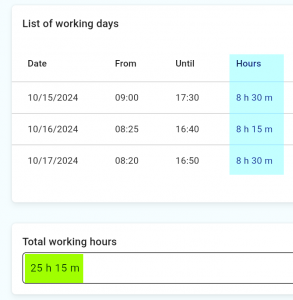
Example of a working time table (duration in hours calculated automatically):
2. PDF File
Inserts a fixed PDF file into the form – for example an installation guide or safety data sheet. The file can be opened by tapping on it while filling in the form.