
Digital timesheet template · fully customizable
Digital timesheets.
Record working hours on the go.
Less admin. More time.
- Works in any industry
- Web portal plus app for iOS & Android
Try free for 14 days · then choose the right plan
 Fully customizable
Timesheet
Example: 8:30 h on site − 0:30 h break
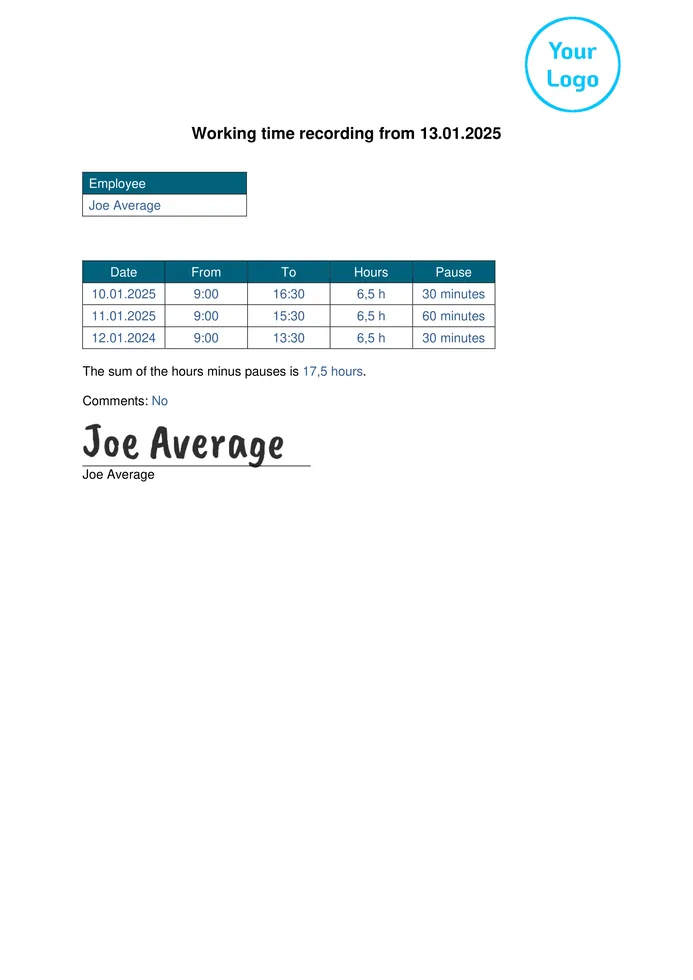
Everything you need for a digital timesheet.
All in one template.
The Formtastic “Time Tracking” template is the starting point for your digital timesheet. Adapt the fields for employee, date, project, start time, end time, break, activity and signature to the way your business works.
- Record working hours consistentlyDocument date, start time, end time and breaks in standard fields.
- Assign hours to projects and jobsRecord employee, project, job number and the work carried out together with the working time.
- Calculate working time automaticallyA calculation field works out the duration from start, end and break using the formula you define.
- Get work records signed digitallyAdd a signature field for employees or customers to the template if needed.
After signing up for free, select the template in the Form Designer and adapt it to your business.
Your existing timesheet template — digital and customizable without coding.
Create a new digital timesheet in the Formtastic web portal or carry over the layout of your current paper, PDF or Word form. Fields and workflows can be adjusted with drag & drop in the Form Designer.
Edit form template
Prepare in the web portal.
Record on mobile. Continue in the office.
The digital timesheet combines central template management in the web portal with mobile time tracking. After syncing, the data is ready in the office for PDF records and Excel export.
- Prepare
Set up the timesheet template in the web portal
Select the “Time Tracking” template, adjust the fields you need in the Form Designer or carry over your existing timesheet digitally.
- Record on site
Record working hours on mobile – even offline
Employees fill in the prepared timesheet in the Formtastic app for iOS or Android. Forms that are already on the device can also be completed without an internet connection.
- Continue in the office
Provide timesheets as PDF and Excel
As soon as an internet connection is available again, the data is synced. PDF records can then be sent by email and the captured form data exported as an Excel file.
Digital time tracking. In everyday use.

“Whether we’re on a construction site or installing fibre, our multilingual teams record working hours and documentation directly on site in the app. With Formtastic’s language feature, every employee can work in their own language — saving our office a huge amount of paperwork and translation effort.”


Then we’ll set up your first digital timesheet for free.
Send us your existing timesheet as a paper form, PDF, Word file or photo. We recreate the layout and the fields you need in Formtastic and set up your first digital template, ready for your team to use.
A plan for every team size.
Start with the features your workflow needs. You can switch to a larger plan at any time.
Solo
Billed annually: €24/month
For individual users who manage digital forms, jobs and records themselves.
- Unlimited templates, jobs and PDFs
- Offline mode and multilingual forms
- PDF, Excel, CSV and media export
- Optional Solo Premium: email sender & Smart Import
Team
Billed annually: €82/month
For small teams that assign forms, work on them together and review them.
- Everything in the Solo base plan
- 5 users included
- Form assignment & review
- Role & permission management
- Custom email sender & Smart Import
Enterprise
Billed annually: €124/month
For companies with larger teams and growing digital workflows.
- Everything in Team
- 10 users included
- All business features included
- Additional users €10/month per licence
- Additional licence costs capped at €500/month
All prices plus statutory VAT · With annual billing, 2 months of the base plan are free.
Questions about digital timesheets with Formtastic
Clear answers on use cases, offline capture, calculation, export and how it differs from payroll.
What is the Formtastic digital timesheet?
The digital timesheet is a customizable Formtastic template for recording working hours consistently. You manage the template in the web portal, employees fill it in in the browser or on mobile, and the office can process the captured data as a PDF, Word or Excel file.
Which businesses is the digital timesheet suitable for?
The template suits companies and organizations in any industry that want to document start times, end times, breaks, projects, jobs or activities consistently. It can be used in the trades, construction, property management and field service. Fields and calculations can be adapted to each workflow.
Can I try Formtastic free for 14 days?
Yes. You can try Formtastic free for 14 days. To keep using it, you then choose a paid plan. Current features and terms are on the pricing page.
Can my team record working hours without internet?
Yes. Forms that are already on the device can be filled in offline in the Formtastic mobile app for iOS and Android. As soon as an internet connection is available again, the data is synced. A connection is needed for the transfer to the web portal and for automatic delivery.
Can Formtastic calculate working hours automatically?
Yes. A calculation field can work out the working time from start, end and break using a formula you define. Test the formula with real examples from your business, especially for rounding, breaks and shifts past midnight.
Can I use my existing timesheet?
Yes. You can adapt the “Time Tracking” template in the Form Designer or use your existing paper, PDF or Word timesheet as the basis. Formtastic helps you set up your first digital template free of charge.
How do completed timesheets get to the office?
After syncing, the form data is available in the web portal. Depending on the template settings, PDF or Word records can be sent by email. Saved form data can also be exported together as an Excel file. Further export and integration options depend on your plan.
How do the web portal and the mobile app work together?
In the web portal you create and manage templates, settings and captured data. For mobile capture, your team also uses the Formtastic app on iOS or Android. Forms can also be filled in in the browser.
Does Formtastic replace a full payroll system?
No. Formtastic focuses on flexible capture, processing and sharing of form data. Whether the Excel or integration export fits your existing payroll or billing system should be checked against your specific workflow. Talk to us about your requirements.
Record working hours digitally. Share records in a structured way.
Set up the customizable timesheet template in the web portal, record hours on mobile and make the data available in the office as PDF or Excel after syncing.
Try free for 14 days · then choose the right plan · get your first template set up for free